
iOS & Android · 14 languages · ages 0–12
The baby tracker that doesn’t get outgrown.
Pixy tracks sleep, feeding and routines from the newborn weeks all the way to age 12 — and predicts the next nap from your child’s own wake windows. That part is free.
- Years, one app
- 0–12Years, one app
- Languages
- 14Languages
- Nap predictions
- FreeNap predictions
- Keeps logging
- OfflineKeeps logging
One app, twelve years
Pixy grows up with your child
Most trackers are built for the first eighteen months and then quietly become useless. Pixy changes what it shows you as your child moves through each stage — same app, same history, different job.
0–2
Infants & newborns
The survival months. Pixy keeps the feeding, sleeping and diaper log in one place so you are not counting hours in your head at 3 a.m.
- Nursing, pumping, bottles and the move to solids
- Diapers, tummy time and how the day went
- Sleep, nap prediction and a bedtime target for the age
- Temperature with a fever alert, medicine reminders, the WHO vaccine schedule
- Height, weight and head circumference against WHO percentiles
3–7
Toddlers & preschool
Routines start to matter more than raw data. The app shifts with them — the newborn screens quietly step aside.
- Potty training: accidents, dry-and-clean and bedwetting
- Morning and evening routines that send the reminder
- Playgroup, kindergarten, swimming and art
- A food checker for the fussy months, and eighteen first foods
- Bedtime routine with a story made for them
7–12
School age
Most baby trackers have already stopped being useful here. Pixy turns into a household rhythm tracker instead.
- Homework, study and reading time
- School, language classes and instrument lessons
- Sports clubs, gymnastics and museum trips
- Chess, board games and coding
- Which routine slips most, and how screen time sits against study
Real screens
A look before you install
Captures from the shipping app, not mockups. The interface moves from a warm daytime view to a dimmed night one on its own.
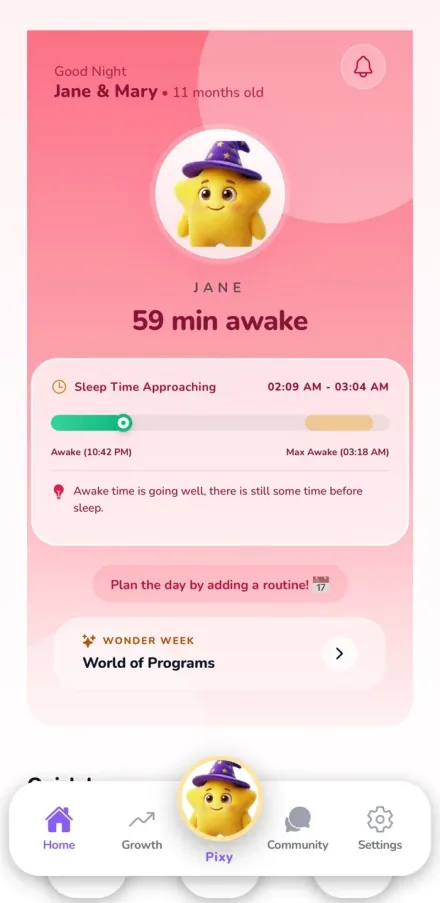
Awake window
How long they have been up, and the window when the next nap should start.
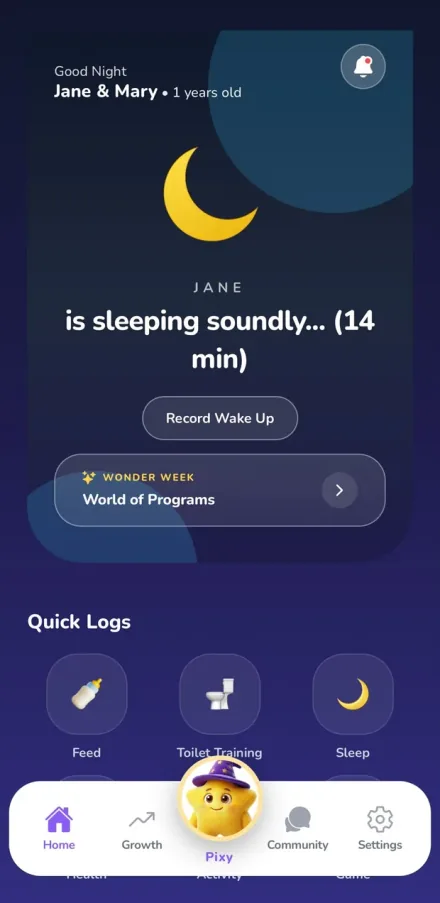
Night mode
After bedtime the app dims itself. Quick Logs stay within thumb reach.
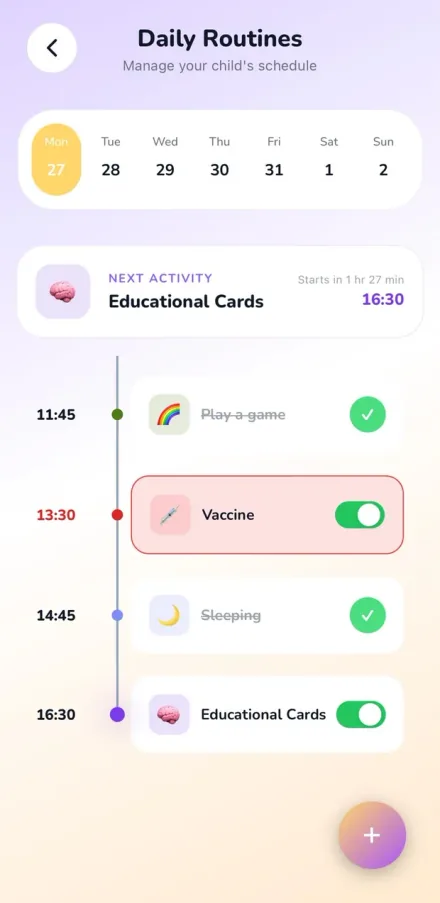
Daily routines
The day as a timeline: done items ticked off, the next one pinned on top with a countdown, anything late marked in red.
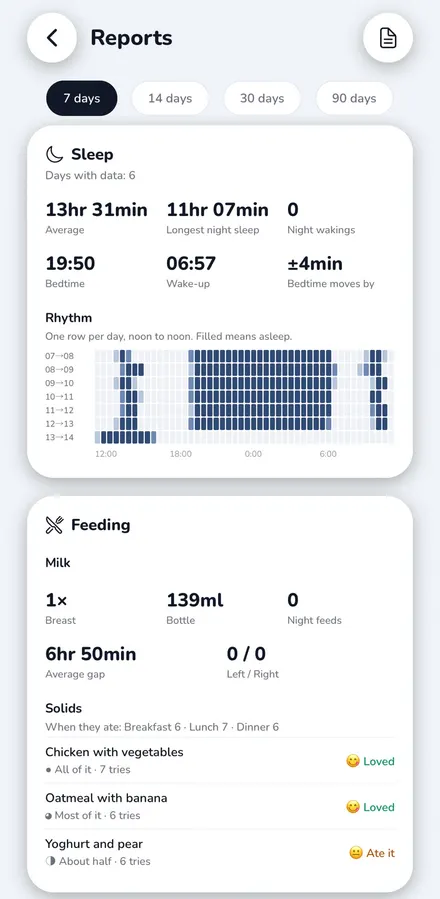
Reports
A week of sleep as one grid, noon to noon, beside bedtime drift, night wakings and what they ate.
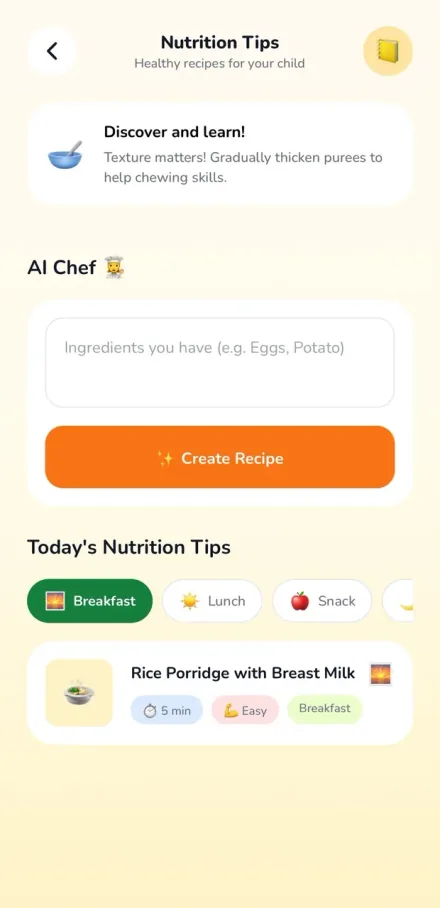
Daily recipes
Three age-appropriate meal ideas a day, with prep time and a hydration tip.
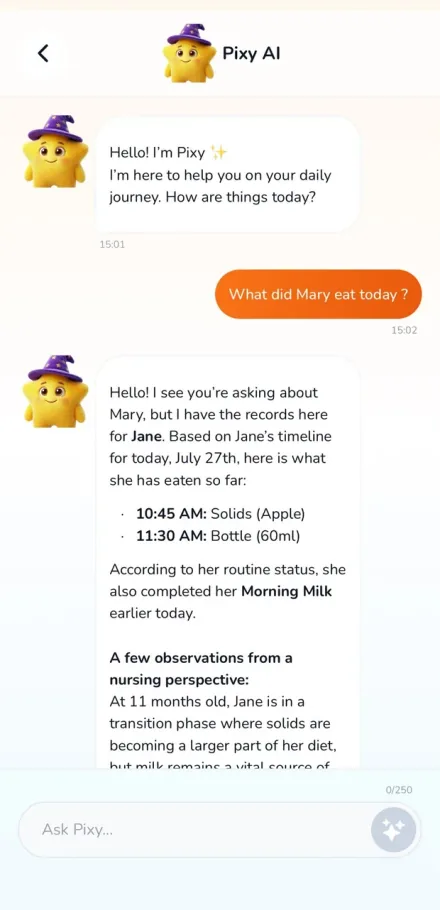
Ask Pixy
Answers come from your child's own logs, not from generic advice.
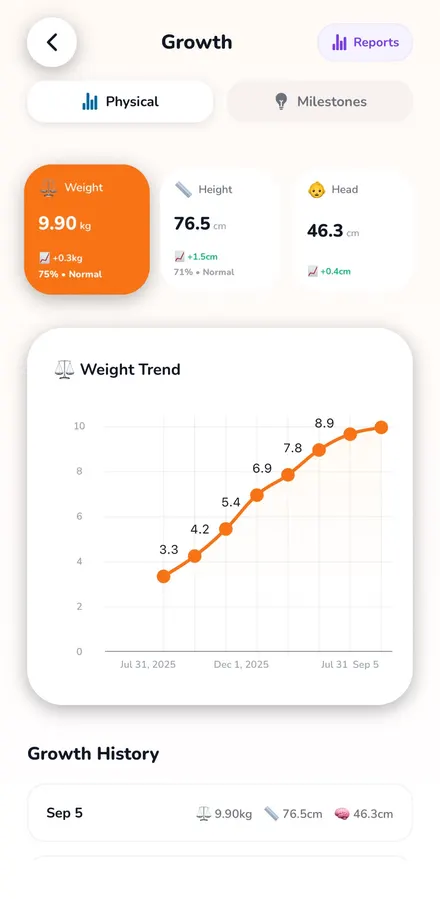
Growth
Weight, height and head circumference, each read against the WHO percentiles.

On the lock screen
On iPhone, a running nap shows on the lock screen, so checking it needs no unlock.
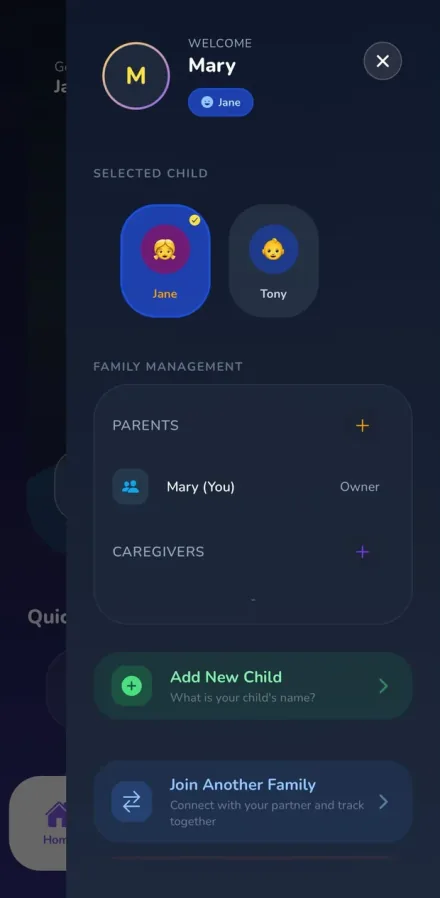
Family sync
Several children, a partner as owner, and caregivers with their own access.
What’s inside
Built for the days you barely remember
Everything below is in the app today, on both iOS and Android.
Six modules, one home screen
Sleep, feeding, health, potty, activity and game — each one a single tap from the home screen. Twenty-two kinds of activity and twenty-one kinds of game, from tummy time to chess.
Sleep Window predictionFree
Pixy reads the wake windows you have already logged and tells you when the next nap or bedtime will land best. It is the core of the app, and it is free — no trial, no paywall.
Log it by saying it
Type "she slept two hours" or "he had 5 oz at 4pm" and Pixy files it correctly. No forms, no timers to remember to stop.
Routines that do the remembering
A morning, afternoon and evening plan with what is next and how long until it starts. Reminders, one tap to complete, and repeats every day or on weekdays only.
Growth you can actually read
Weight, height and head circumference plotted against WHO percentiles, with milestones marked along the way.
Reports that read the log back
A sleep rhythm grid, one row per day, plus night wakings and how far bedtime has drifted. Food variety, which routine slips most, screen and study time.
Is she ready for this yet?
Check a food against her age, see the allergen risk, and let Pixy walk the three-day rule for you. Eighteen first foods are ready to go.
Widgets that say something
Live sleep and awake timers on the Home Screen, the next sleep window, and one tap to switch between children. Lock Screen widgets on iPhone too.
The timer stays on your Lock ScreeniPhone
Start a sleep and it keeps counting on the Lock Screen and in the Dynamic Island. At 3am you can see how long they have been down without unlocking anything.
Hands full? Ask SiriiPhone
Start or end a sleep with your voice, or put it on the Action button. Built for the moments when one arm is already holding a baby.
Parent and caregiver rolesPaid
Your partner, a grandparent or a nanny can log to the same child in real time. Everyone sees the same day. How many adults can join depends on the plan; the free one is a single account.
Works with no signal
Log in the car, at the clinic, on a plane. Pixy syncs the moment you are back online.
Memories
First words, first steps, the small things you swear you will remember and never do. Kept alongside the data.
A PDF for the paediatrician
Weeks of sleep, feeding and nappies as one summary — or your child's health history: measurements against percentiles, vaccinations, fever episodes and what was prescribed at each visit. Export it, hand it over at the appointment.
14 languages
Fully localised, not machine-translated labels — including Turkish, Arabic, Japanese, Hindi and Simplified Chinese.
Pixy Community
An anonymous forum where parents compare notes on the questions nobody puts in a baby book.
Bedtime
After bedtime, so does the app.
The screen dims itself, the Quick Logs move into thumb reach, and the sleep timer keeps counting on the Lock Screen. From here down, this is the app you will actually be holding.
Pixy AI
Three assistants for the hard parts
All three are open on a free account from the first day, on a daily allowance rather than behind a wall — a subscription simply raises the volume. These are the jobs that need something more than a log.
AI Chef
Give it your child's age, allergies and whatever is in the fridge. It comes back with something they will actually eat.
Magic Storyteller
A new bedtime story every night, with your child as the main character and the themes they are currently obsessed with.
Pixy AI chat
The 2 a.m. questions — teething, regressions, screen limits — answered without waiting for a forum reply.
Where we stand
Plainly, about your data
No badges we haven’t earned and no compliance logos borrowed from someone else’s audit. Just what is actually true.
- We do not sell your data
- Your child's logs are not a product. No data brokers, no advertising profiles built from your family's routine.
- Not a medical device
- Pixy is a tracking tool. It does not diagnose or treat anything, and it is not a substitute for your paediatrician.
- Your data stays yours
- Offline mode keeps the app working without a connection, and you can permanently delete your account and everything in it from inside the app.
Guides
The things you look up at 3am
Plain answers on wake windows, growth charts, solids and screen time.
- Choosing an app
Baby tracker apps compared: Pixy, Huckleberry, Baby Tracker and Napper
Huckleberry and Baby Tracker both put nap prediction in a paid tier; Pixy and Napper include it free. On age range the split is different: Huckleberry covers newborn to five and the others are built around babies, while Pixy runs to twelve. Core logging is free in all four, so the real question is which paywall you will hit and when.
- Choosing an app
Huckleberry alternatives: which trackers predict sleep for free
Huckleberry’s free tier covers tracking and basic reports, but SweetSpot — its nap and bedtime prediction — sits in the Plus and Premium memberships. If prediction is the reason you were looking, Napper, Sofi and Pixy all include it in their free versions, and a growing number of smaller trackers do too. What separates them is what they charge for instead: Napper sells sounds and expert content, Sofi sells nothing at all, and Pixy sells scale rather than features — the whole record history, the household on one account and the PDF health file, with the AI tools already open on a daily allowance.
- Sleep
Building a bedtime routine that actually works
A good bedtime routine is short, identical every night, and ends in the room where your child will sleep. Twenty to forty minutes is enough. Consistency of order matters far more than which activities you choose.
Common questions
Everything parents ask first
What is Pixy?
Pixy is an AI baby and kid tracker for children aged 0 to 12. Six modules share one home screen — sleep, feeding, health, potty, activity and game — each a single tap, alongside daily routines with reminders, reports that read the log back, growth charts, milestones and home screen widgets. It predicts the next nap from your child's own wake windows, files logs written in plain language, and includes AI tools for recipes, bedtime stories and parenting questions. Available on iOS and Android in 14 languages.
Is Pixy free?
Yes, and not on a trial. The six quick-log modules, Sleep Window prediction, daily routines, reports, widgets, growth charts and milestones are all free, and a free account can use all three AI tools straight away on a daily allowance. A subscription is about scale: the whole record history, unlimited routines and memories, more AI, the PDF health file, and room for more children and more adults on one account.
What ages is Pixy for?
Ages 0 to 12. The interface changes as your child grows: newborn feeding and diaper logs for 0–2, potty training and kindergarten routines for 3–7, and homework, chores and activity schedules for 7–12. You do not switch apps as they get older.
How does Pixy predict nap times?
The Sleep Window algorithm analyses the wake windows in your own logs — how long your child has actually stayed awake between sleeps — and projects when the next nap or bedtime will land best. The more you log, the closer it gets to your child specifically rather than a generic chart.
Can both parents use the same account?
Yes, on a family plan. One child profile syncs in real time across partners, grandparents or a nanny, with separate parent and caregiver roles so somebody can log without being handed the whole account — everybody writing into one shared day rather than three separate versions of it. The free version is set up for one adult, so this is the reason to look at Core Family or Big Family.
Does Pixy work without internet?
Yes. Offline mode lets you keep logging with no connection, and everything syncs automatically once you are back online.
What languages does Pixy support?
Fourteen: English, Turkish, German, French, Spanish, Italian, Portuguese, Dutch, Russian, Arabic, Hindi, Japanese, Korean and Simplified Chinese.
Is Pixy a medical device?
No. Pixy is a tracking utility for daily routines. It does not provide medical diagnoses or treatment, and it should not replace advice from a qualified healthcare professional.
How is Pixy different from other baby trackers?
Three things. It is a record of the whole day rather than a sleep app — six quick-log modules on one screen, plus routines with reminders, reports that read the log back, and widgets on the home and lock screens. It covers ages 0 to 12 rather than stopping at toddlerhood, so the app adapts instead of being outgrown. And logging works through plain language — you describe what happened and Pixy files it. Free sleep prediction comes with all of it, though several trackers now do that too.
Which devices does Pixy run on?
iPhone and iPad via the App Store, and Android phones and tablets via Google Play. Both versions include dark mode for night-time logging.

Start with tonight’s bedtime
Log one day and Pixy already has something to work with. Sleep predictions cost nothing, so there is no trial clock running while you decide.